Are eSignatures Really Legally Binding? A Guide for Business and IT Leaders
—

For most business and IT leaders, the question isn’t whether you can use electronic signatures—it’s whether they will actually hold up if challenged in court or during a regulatory audit.
As organizations move away from paper, the phrase "legally binding" becomes the benchmark for any digital transformation project. In Canada and the US, the answer is a resounding yes, but with a significant caveat: legality depends on the evidence, not just the image of the signature.
The Simple Legal Truth
Under federal laws like PIPEDA in Canada and ESIGN/UETA in the United States, an electronic signature carries the same legal weight as a "wet-ink" signature. A contract cannot be denied legal effect simply because it is in electronic form.
However, to ensure your agreements are legally binding, your chosen solution must satisfy four specific pillars of evidence:
1. Intent to Sign
Like a physical signature, the digital process must demonstrate that the signer intended to be bound by the document. This is usually achieved through clear "Click-to-Sign" buttons or typed names with an affirmative action.
2. Consent to Do Business Electronically
Before signing, the parties must agree to conduct the transaction electronically. This is why you’ll often see a "disclosure and consent" pop-up at the start of a digital signing session.
3. Document Integrity (Tamper-Evidence)
This is where standard eSignatures and Secure Digital Signatures diverge. To be legally robust, you must prove the document hasn't been altered since the signature was applied.
4. The Audit Trail (The "Gold Standard" of Evidence)
An eSignature is only as good as the data behind it. A court-admissible Audit Trail must track:
Who signed: Email addresses, IP addresses, and authentication methods.
When they signed: Secure timestamps of every action (viewed, consented, signed).
How they signed: The specific workflow used to capture the signature.
Process Fusions SecureSignature is a cloud-based e-signature solution designed to streamline document approvals with legally binding signatures and built-in security. Sign and send from anywhere, track every step, and eliminate manual paperwork—without sacrificing compliance or control.
How SecureSignature Works
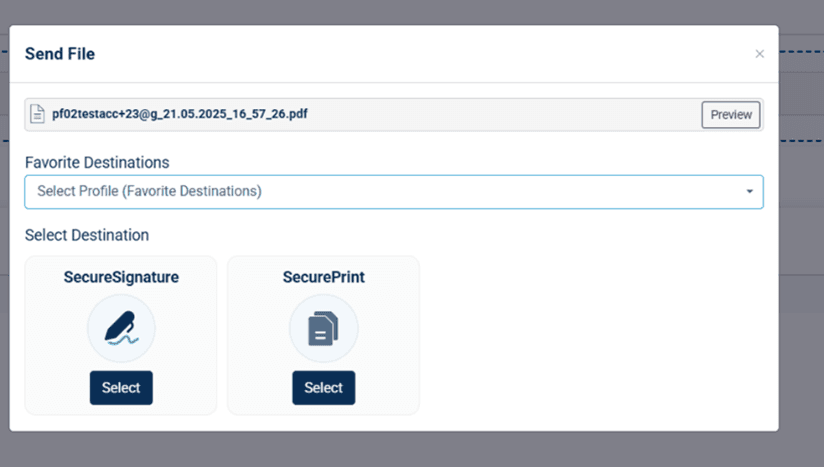
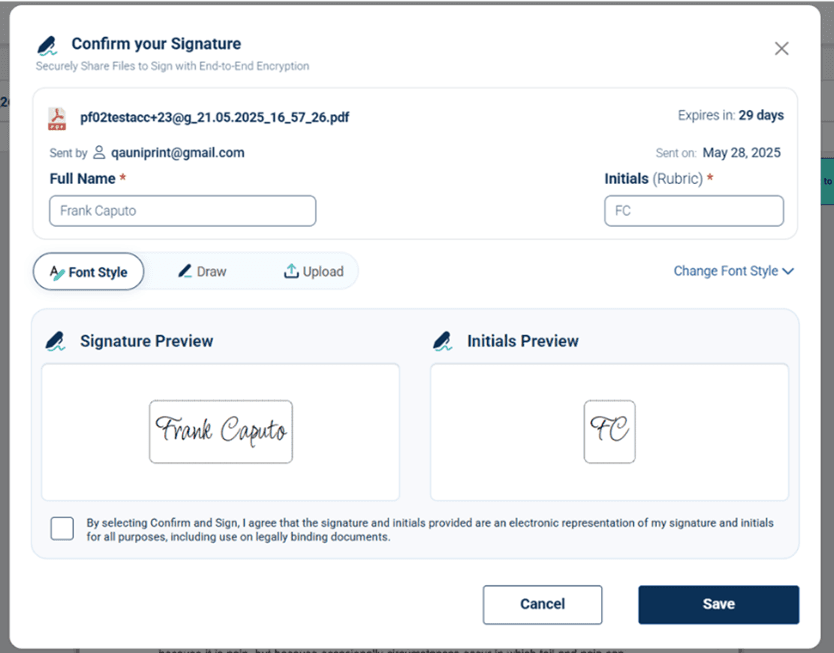
Step1. Upload and Prepare Documents
Select recipients and add signing fields
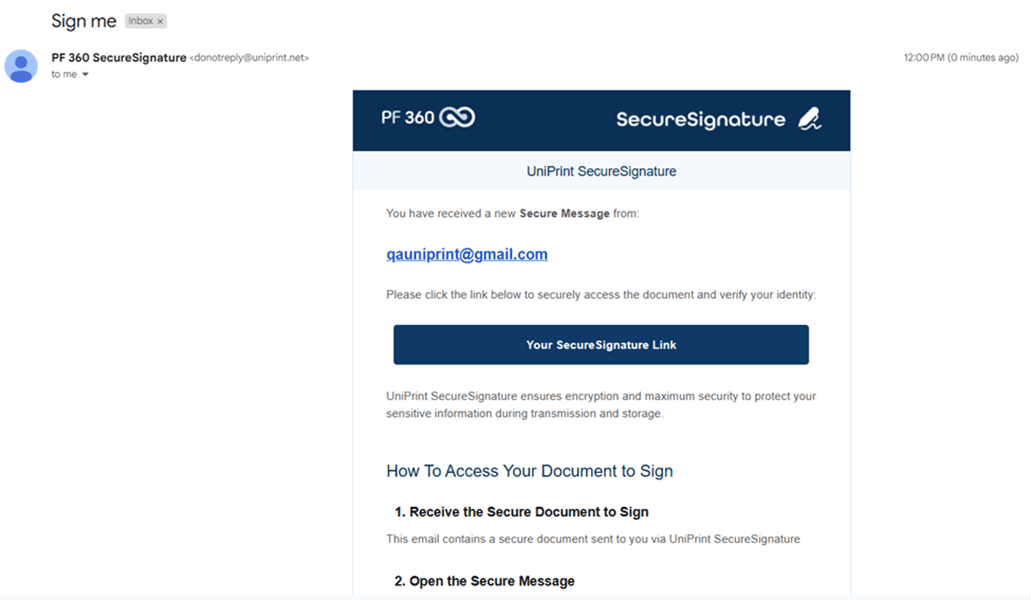
Step2. Send Securely Through E-mail
Apply policy-based encryption and share instantly
Step3. Track, Audit & Store
View signing progress, store signed files, and maintain compliance
Learn more about SecureSignature features here…
What to Ask Your eSignature Vendor
If you are evaluating a secure signature platform, don't just look at the user interface. Ask these three critical questions to ensure your documents remain compliant:
Can I export a completion certificate/report for every electronic signature PDF?
Can I require MFA for certain documents?
Is the document tamper-evident after I digitally sign the PDF document?
Can I configure signing order, reminders, and expiry?
Is the Audit Trail bundled with the document?
How do you handle "Non-Repudiation"? (i.e., How do you prevent a signer from later claiming, "That wasn't me"?)
Is the document "Self-Contained"? Does the PDF contain its own proof of validity, or does it require your software to verify it 10 years from now?
Why Secure Signature Beats "Simple" eSignatures
At Process Fusion, we believe that business and IT leaders shouldn't have to choose between ease of use and legal certainty. By integrating secure, PKI-based signatures into your automated workflows, you ensure that every contract is not just signed, but protected by an unbreakable digital seal and a comprehensive audit trail.
FAQ
Q: What makes an eSignature legally binding?
A: Legally binding eSignatures typically require intent to sign, consent to sign electronically, document integrity (tamper evidence), and a reliable audit trail showing who signed and when.
Q: How do I add a signature to a PDF document securely?
A: To add a signature to a PDF document securely, use a dedicated platform that offers encryption. You simply upload the file. The "Insert Signature in PDF Document" tool will guide you in placing your mark, and the system generates an audit log.
Q: Why does an audit trail matter for an electronic document PDF?
A: It provides evidence for compliance, investigations, and disputes. It proves the electronic signature process was authentic and controlled, making it much harder for a signer to claim they didn't sign the document.
If your documents are regulated or high-risk, don't settle for just knowing how to create an electronic signature. Ask for a Secure Signature walkthrough focused on audit trails and completion evidence.


LIFE AT PROCESS FUSION
Team activities that turn colleagues into community
From social gatherings and shared celebrations to collaborative activities, we create space for people to connect beyond projects. These moments strengthen relationships, spark new ideas, and make everyday teamwork more meaningful.
01
Pride
We take pride in the work we create, the customers we support, and the positive impact we make together. Every contribution matters, and shared ownership turns good work into meaningful progress.
02
Trust
Open communication, respect, and accountability give people the confidence to contribute fully. We trust one another to share ideas honestly, follow through, and grow from every challenge.
03
Camaraderie
Shared experiences, team activities, and everyday support create genuine connection. We make room to laugh, celebrate, and help one another—building a community where people feel they belong.


